Help with a fitted kit? Photograph every connection, the DIP switches and the problem first.Get support →Find your guideContact usAbout us
Shopping Cart: 0 Products
Menu
Need help with a fitted kit? Before you contact us, photograph every connection, the DIP switches and the problem.Get support →

Mercedes Benz (2018-2022) NTG5.5/NTG6.0 Retrofit CarPlay and Android Auto Upgrade Kit

★★★★★5.0· 160+ Google reviewsRead reviews →

£475.00

  • Wireless Apple CarPlay and Android Autoon your car's own screenSound through the car's own Bluetooth
  • Your touchpad, controller and wheel buttonswork CarPlay; hold end-call to switch over
  • Plug and play at the head unitnothing cut or joined; about 1.5 to 2 hours
  • An installation guide for NTG5.5 and one for MBUXevery step photographed, included free

Datasheet: IMI-1000_- Datasheet_Sept_2024 pdf 3.52Mb


The IMI-1000 from Integrated Automotive UK is a retrofit CarPlay and Android Auto Kit that adds Carplay and Android Auto to the factory fitted Mercedes NTG5.5 and NTG6.0 audio system, found in Mercedes models manufactured between 2018 and 2021 (larger 12in display found on facelift models). Our kit gives an “OEM” feel and appearance as it retains the existing Mercedes display screen mounted on your dash and connects to the rear of the original head unit, this kit enables you to control CarPlay/Android Auto with the existing rotary controller and steering wheel controls or touch screen, if fitted.

Our solution will allow the user to remain connected to the mercedes bluetooth system, and also fascilitate streaming of audio direct from the phone to the car. This provide the best possible quality audio and calling quality.

Integration with Mercedes Steering Wheel Controls

Mercedes NTG5 steering wheel retrofit CarPlay and android auto integration

The IMI-1000 will integrate with your steering wheel controls such as Volume adjust, “Hang up” and “Pick up”

Integration with Mercedes Rotary Controller and Buttons

Mercedes NTG5 retrofit CarPlay and android auto rotary controller integration

The IMI-1000 will utilise the Mercedes central console rotary controller and associated buttons to provide a seamless integration with your mobile phone

HOW DOES IT WORK?

1. Start ignition

2. IMI-1000 automatically re-pairs with your phone (iPhone or Android phone)

3. CarPlay/Android Auto Automatically starts up on your phone

4. Mercedes COMAND switches to CarPlay/Android Auto automatically

5. You can switch between the Mercedes interface and CarPlay by pressing and holding “HANG UP” on the central console


CONNECTION DIAGRAM

Imi-1000 retrofit CarPlay and Android Auto connection diagram

Mercedes C Class W205 Facelift Retrofit CarPlay and Android Auto Demonstration Video (Update Dec 2024 – Direct Bluetooth Audio Steaming providing better THD+N and SNR!)
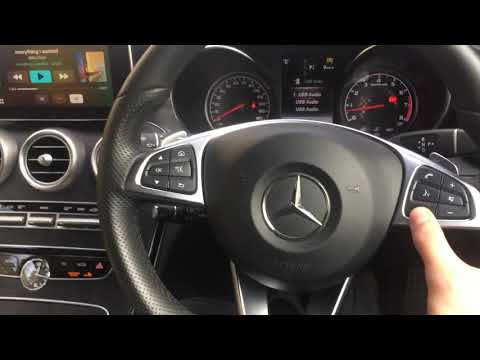
Mercedes C Class W205 NTG5 Retrofit CarPlay and Android Auto Kit by Integrated Automotive UK

Cameras:

This kit is compatible with various front parking camera, reverse parking camera and 360 degree cameras.

OUR TECHNOLOGY

Imi-1000 main pcb
The IMI-1000 main PCB is a high speed microcomputer focusing on providing an OEM experience
  • Highest Quality Components
  • Low Noise DAC and Analogue Amplifier Stage
  • Fast boot time
  • High Speed Graphics Driver
  • Integrated CAN Transceiver
  • Direct Bluetooth Audio Connection to Mercedes System

Please contact sales@integratedautomotive.co.uk or WhatsApp 07454103323 to confirm your car's compatibility.

  • Same-day despatchOn orders placed by 2 pm (working days), for next-day delivery, usually by DPD.
  • UK delivery £10Europe and worldwide: priced at checkout
  • One-year warrantyA faulty item is replaced free of charge
  • ReturnsUnopened and unused: tell us within 14 days

Delivery, returns and warranty →

Add a reverse camera Optional

The IMI-1000 has its own camera input, and the installation guide covers connecting it.

Complete the installation

Add a reverse camera. The installation guide has a chapter on connecting one to the IMI-1000, so it can be fitted at the same time as the kit.

SKU: NTG-5.5-6 800-352-353 800-534 Category:

IMI-1000 · kits 800-352 / 800-353, 800-354

CarPlay and Android Auto, as if they came with the car.

The IMI-1000 adds wireless Apple CarPlay and Android Auto to Mercedes-Benz models with NTG5.5 (the wide screen before MBUX) and with MBUX, the NTG6.0 system. It uses the screen already on your dashboard, and you control it with the touchpad and the round controller, or on MBUX cars the touchpad and the touchscreen.

Each system has its own kit and its own installation guide: 800-352 (8.4-inch screen) and 800-353 (12.3-inch screen) for NTG5.5, 800-354 for MBUX. The car's own system stays exactly as it is: press and hold the end-call button on the steering wheel to switch between it and CarPlay or Android Auto. Every connection is a plug at the back of the head unit, and the sound goes through the car's own Bluetooth.

Fits these Mercedes-Benz models

E-Class, NTG5.5, 8.4-inch screenW213, S213 with Audio 20 · kit 800-3522016 to 2020
E-Class, NTG5.5, 12.3-inch screenW213, S213, C238, A238 · kit 800-3532016 to 2020
C-Class, NTG5.5W205, S205, C205, A205 facelift, large 10.25-inch screen · kit 800-3532018 to 2021
S-Class, NTG5.5W222 facelift · kit 800-3532017 to 2020
S-Class coupé and cabriolet, NTG5.5C217, A217 · kit 800-3532017 to 2021
CLS, NTG5.5C257 · kit 800-3532018 to 2021
G-Class, NTG5.5W4632018 to 2020
Mercedes-AMG GT 4-door coupé, NTG5.5X2902018 to 2020
GLC, NTG5.5X253 facelift2019 to 2022
A-Class, MBUXW177 hatchback and saloon · kit 800-354from 2018
E-Class, MBUXW213 family after the facelift · kit 800-354from 2020
GLE and GLS, MBUXW167 (and GLE Coupé), X167 · kit 800-354from 2019

Years are typical: the year alone does not decide it, the car does. NTG5.5: a wide screen on top of the dashboard, no "Hey Mercedes" and no touchscreen. MBUX (NTG6.0): the car answers "Hey Mercedes" and the media screen is a touchscreen. Each guide shows how to check. The kit is for NTG5.5 and NTG6.0 only: of the MBUX cars, it fits only the NTG6.0 cars listed here (A-Class W177, E-Class after the facelift, GLE, GLS), and no other MBUX car. Earlier cars with NTG5.0 take kit 800-351.

On NTG5.5, measure the screen's picture corner to corner: 8.4 inches (21 cm) is kit 800-352, 12.3 inches (31 cm), and the C-Class's 10.25-inch screen, is kit 800-353.

In the box

What you get.

  • The IMI-1000 moduleThe IMI-1000 moduleComes with its two Wi-Fi aerials. The DIP switches for your screen are on its edge; the label underneath gives the setting.
  • Power harnessPower harnessFits between the head unit and the car's 48-pin plug. Its loose leads are for an optional camera.
  • Display leadDisplay leadJoins the module to the head unit's DISP socket and the car's own display plug. The 8.4-inch and 12.3-inch kits' leads look the same but are wired differently: use only the one from your kit.
  • USB leadUSB leadA USB socket for your phone.
  • Installation guideInstallation guide30 pages, every step photographed. Free to download.

Photos show the 8.4-inch kit, 800-352; the 12.3-inch kit, 800-353, has the same parts. You will also need a Torx T20 screwdriver or bit for the console and head-unit screws. A plastic trim tool is optional.

Included with every kit

The installation guide: NTG5.5. Every step photographed. Every plug numbered.

Most kits arrive with a single sheet of paper. Ours comes with a 30-page guide, written for your car and tested on the bench, that takes you from the first trim clip to the last check.

  • 30Pages
  • 9Sections
  • 1.5–2Hours to fit
  • EasyDifficulty
  1. 01One guide, written for your car

    For Mercedes-Benz models with NTG5.5, before MBUX: the E-Class W213, the C-Class W205 facelift, the S-Class W222 facelift and the CLS C257, with one kit per screen size.

  2. 02If you need help, send photos first

    What to photograph as you go, so that we can help quickly if you ever need us.

  3. 03What is in the box

    Every part photographed, with the connection number each plug makes, so you can check the kit before you begin.

  4. 04Taking out the head unit

    One action per step, each with its own photograph: the armrest trim, the centre console panel, then the head unit.

  5. 05The wiring diagram

    Five connections, all on the back of the head unit. Every plug is numbered, and nothing is cut or joined.

  6. 06Each connection, one by one

    The 48-pin plug with its lever, the fibre-optic plug if your car has one, and the display plug in the socket marked DISP.

  7. 07Switch on and test

    Test everything before you refit a single panel, while every plug and the DIP switches are still easy to reach.

  8. 08Troubleshooting

    Look up what you see on the screen, and the fix is beside it.

IMI-1000 Installation Guide: Mercedes-Benz NTG5.5 · Edition 4, October 2026 · PDF, 9.8 MB

Page 1 of the installation guide: One guide, written for your car
One guide, written for your carFor Mercedes-Benz models with NTG5.5, before MBUX: the E-Class W213, the C-Class W205 facelift, the S-Class W222 facelift and the CLS C257, with one kit per screen size.
Page 3 of the installation guide: If you need help, send photos first
If you need help, send photos firstWhat to photograph as you go, so that we can help quickly if you ever need us.
Page 8 of the installation guide: What is in the box
What is in the boxEvery part photographed, with the connection number each plug makes, so you can check the kit before you begin.
Page 12 of the installation guide: Taking out the head unit
Taking out the head unitOne action per step, each with its own photograph: the armrest trim, the centre console panel, then the head unit.
Page 14 of the installation guide: The wiring diagram
The wiring diagramFive connections, all on the back of the head unit. Every plug is numbered, and nothing is cut or joined.
Page 17 of the installation guide: Each connection, one by one
Each connection, one by oneThe 48-pin plug with its lever, the fibre-optic plug if your car has one, and the display plug in the socket marked DISP.
Page 20 of the installation guide: Switch on and test
Switch on and testTest everything before you refit a single panel, while every plug and the DIP switches are still easy to reach.
Page 24 of the installation guide: Troubleshooting
TroubleshootingLook up what you see on the screen, and the fix is beside it.

Details

More about this kit.

Questions

Before you order.

Which system does my car have?

With the ignition on, say "Hey Mercedes" or touch the media screen. If the car answers and the screen reacts to your touch, it has MBUX (NTG6.0): kit 800-354. If neither happens, and you work the wide screen with the touchpad and the round controller, it has NTG5.5: kit 800-352 or 800-353 by screen size. Each installation guide has a page of checks.

Which NTG5.5 kit do I need for my screen?

Measure the picture from one corner to the opposite corner. 8.4 inches (21 cm), the Audio 20 screen: kit 800-352. 12.3 inches (31 cm), the wide screen, and the C-Class's 10.25-inch screen: kit 800-353. The two kits' display leads look the same but are wired differently inside, so never swap leads between kits.

How long does it take to fit?

About 1.5 to 2 hours for a first attempt; both guides rate it Easy, plug and play. All five connections are on the back of the head unit, at the car's main plug and its display plug. Nothing is cut or joined. You need a Torx T20 screwdriver, and on some MBUX cars a Torx T10.

How does the sound reach my speakers?

Through the car's own Bluetooth, so the car must be able to play music from a phone over Bluetooth: check that before you start. There is no AUX lead or USB adapter. Calls use the car's own microphone; there is no microphone to fit.

How do I switch between CarPlay and the car's own system?

Press and hold the end-call button on the right of the steering wheel: about three seconds on NTG5.5 (or the BACK button on the centre console), about two seconds on MBUX. Press and hold the same button again to switch back. Wait 10 seconds after the ignition comes on: the IMI-1000 needs that long to start.

Will my controller and buttons still work?

Yes. With CarPlay or Android Auto on screen, the touchpad or round controller and the back button on the centre console work it, and the volume control on the steering wheel sets the volume. On a GLE or GLS, Car type is set to 2 in the IMI-1000's settings; the MBUX guide says when.

Can I add a reverse camera?

Yes. Each installation guide has an optional chapter on fitting a reverse camera to the IMI-1000.

Can I read the installation guides before I buy?

Yes. Both guides, 29 pages for NTG5.5 and 28 for MBUX, are free to read and download, so you can see exactly what fitting involves before you order.

Description

The IMI-1000 is a retrofit CarPlay and Android Auto upgrade kit which adds wireless connectivity to Mercedes Vehicles equipped with a central display.

Compatibility;

Model: Mercedes Benz A Class 10.25in Display 2018-2020

Model: Mercedes Benz C Class 10.25in Display 2018-2020

Model: Mercedes Benz E Class NTG5.5 (non touch) 12.3in Display 2017-2020

Model: Mercedes Benz E Class 12.3in NTG6.0 (with touch) Display 2017-2020

Model: Mercedes Benz GLE Class 12.3in Display 2017-2020

The IMI-1000 works by communicating with your existing entertainment system as well as your in-car entertainment system (Including the OEM Steering wheel controls, rotary controls, touchscreen(if fitted), vehicle speaker system and the Central Information Display). It operates in either by-pass mode or in “active mode”. In by-pass mode the IMI-1000 does not affect the normal operation of the in-car entertainment system, the standard Mercedes COMAND user interfaces will be shown on the CID when in by-pass mode. Active mode is initiated when you connect your mobile phone to the car via the wireless Bluetooth connection or USB cable. After connection, the IMI-1000 activates CarPlay or Android Auto (dependent upon the operating system of your phone, iOS or Android). The Central Information Display (CID) will then show the CarPlay or Android Auto user interface and unleash the power of CarPlay/Android Auto!

Additional information

Weight 1.3 kg
Dimensions 15 × 10 × 10 cm
NTG Version

NTG5.5(without touch screen), NTG6.0(with touch screen)

Reviews

There are no reviews yet.

Only logged in customers who have purchased this product may leave a review.